

Smart IPTV (also known as SIPTV) is a versatile IPTV smart player that enables users to stream live channels and video-on-demand content through M3U URLs. The smart iptv app doesn’t provide any content directly – it functions purely as a player that requires users to input an M3U URL from their chosen provider. To unlock full functionality and link your M3U profile, a one-time activation fee of €5.49 is required.
Core Features
- Comprehensive EPG functionality showing upcoming programming for all channels in your smart iptv channel list
- Support for 4K quality streaming (dependent on your IPTV service provider’s capabilities)
- Convenient favorites system to bookmark preferred channels
- Ability to create and customize multiple playlists according to viewing preferences
- User-friendly interface making channel navigation effortless on your iptv smart tv
Is the Smart IPTV Player Legal to Use?
The iptv smart player is completely legal to use since it doesn’t host any content internally – it simply serves as a streaming platform for content provided through your service provider. However, when accessing content from unofficial IPTV sources, it’s recommended to use reputable VPN services such as NordVPN for added security.
SIPTV Supported Devices
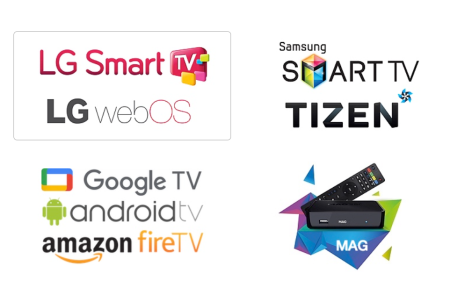
The application is officially available on the Google Play Store for Google TV and Android TV devices. For other Android devices including smartphones, tablets, and Firestick, users can download the APK directly from the official website (apk.siptv.app).
LG TV users can download the smart iptv app directly through the LG Content Store. Samsung Smart TV owners need to adjust certain TV settings to install the player. Detailed installation instructions for Samsung TVs are available on their support page (https://siptv.app/howto/sammy/).
How to Activate Smart IP-TV Player
The platform IP SMART IP-TV offers a single lifetime plan priced at €5.49. Activation can be completed through their official website.
- Navigate to Smart IP TV’s official website (https://siptv.app/activation/).
- Select the Activation tab and input your device’s MAC Address.
- Choose your preferred payment method – either PayPal or Debit/Credit Card.
- Process the payment to activate your account.
How to Configure ip Smart IP-TV Player to Watch M3U URL
Configuration is only possible after purchasing the Smart IP.TV subscription.
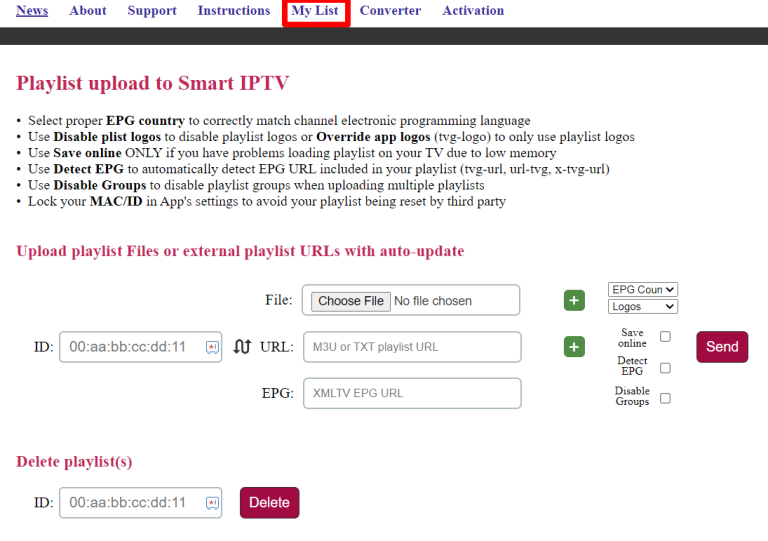
- Access the My List page (https://siptv.app/mylist/) through your device’s browser.
- Enter your device MAC ID and paste the M3U URL provided by your service provider.
- Click Send and restart the installed player.
- After submitting, your smart ip-tv channel list will automatically load onto your device.
ip Smart-IPTV : Frequently Asked Questions
Is the ip Smart IPTV player supported on Apple devices?
The IP-TV Smart Player is not currently compatible with iOS devices including iPhone, iPad, or Apple TV platforms.
Does the Smart IPTV player have Xtream API support?
The iptv smart app only supports M3U URL format and does not include Xtream Codes API functionality.
Does the Smart IP-TV player offer a catch-up facility?
No, catch-up functionality is not available on this iptv smart tv platform.
Conclusion
Smart IPTV transforms your television experience by providing flexible access to thousands of channels and on-demand content. Looking for a solution to enjoy your favorite programs without the limitations of traditional subscriptions? This comprehensive guide is designed for you.
Indeed, the Smart IPTV app has become one of the most popular applications for streaming IPTV content across various devices. While its installation and configuration might seem complex for beginners, we’ve created this detailed guide that explains step-by-step how to install, activate, and configure Smart IPTV in 2025.
Whether you’re using a Smart IPTV on Samsung TV, Android box, Fire Stick, or even a computer, you’ll find all the necessary information to get started quickly. Additionally, we’ll share optimization tips to enhance your viewing experience and resolve common issues with your IPTV smart TV setup.
Leave A Comment